Learning Python the Language (in case of)
Related:
- /jupyter
- /Learn-Django
- /python-gui: desktop GUI/frontend
- /py-cookbook : code reuse
- /pyvis: plot in py
- Python in Win by MS official tutorial CN
- 用 Rust 让 numpy、scikit 和 pandas 加速 100 倍!开源 Weld 技术揭秘
学 Python ,开头几件事: 熟悉基础语法 + 使用虚拟环境。 之后,考虑:1. 基于 uv 使用 AI-IDE 的 CLI; 2. Linux。
Basic Python Data Processing Grammar #
以 菜鸟教程网 为主打基础(py 基础语法、常用的数据处理 py 包):
- python: 熟练使用迭代器之前的所有内容,理解之后的内容。基础教程: 菜鸟教程 runoob.com (提示:此网页中的“高级教程”是指基础教程的高级部分), 如果不是专业软件开发人员,只是做科研实验,可以先学基础的基础,即学到“编程第一步”,“编程第一步”之后的内容用 1 小时过一遍备查即可。
- 重要:对于基础的基础示例代码,一定要跟着一个字母一个字母敲(做到自己完全能写出来一段,熟悉这些基础函数的调用方法和常用参数),绝对不要直接复制粘贴。
- np (numpy): 到“排序”,应该跟着做,要能完全看懂;“排序”后的内容、scipy,过一遍,用时再学。
- pd (pandas):到 DataFrame,应该跟着做,要能完全看懂;之后的内容过一遍,用时再学。
- scikit-learn : 到 Sklearn 机器学习模型, 应该跟着做,要能完全看懂;之后的内容过一遍,用时再学。
- 机器学习:scikit-learn 中包含的几个最基础的算法,建议跟着做,至少做一个最最基础、最易理解的 K 近邻算法,其他的至少要能完全看懂,学习目标:学完后能够知道经典的机器学习流程、基本原理。
如果看菜鸟教程都看不懂,可以看黑马视频教程,优点是极其详细,缺点是信息密度极低。
安装 UV 虚拟环境 INSTALL VIRTUAL ENV w/ UV #
从学习 python 的一开始,每个项目就应该使用各自的虚拟环境,以避免影响系统环境!
新手先看此视频【仔细跟着做!】:全面掌握UV:Python下一代环境管理懒人工具(Python五分钟). (此作者的其他视频质量也不错)
中级:uv、Python 虚拟环境的自动激活与取消(direnv).
从其他角度一进步理解 (可略过): 让uv管理Python的一切, 最后一个 Python 包管理器UV.
old/deprecated: /conda-venv: Conda/Anaconda, poetry, pyenv, pipenv etc.
TIP: see /jupyter for virtual env + jupyter kernels. 【this will be replaced by AI-IDE】
on win (tested on win 11) #
powershell -c "irm https://astral.sh/uv/install.ps1 | iex"
$env:Path = "C:\Users\sunbi\.local\bin;$env:Path"

# or in cmd:
# set Path=C:\Users\sunbi\.local\bin;%Path%
nix/mac #
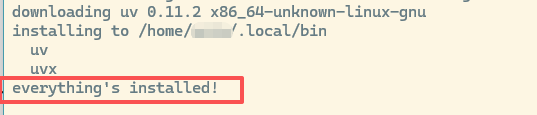
curl -LsSf https://astral.sh/uv/install.sh | sh
强烈不推荐此方法 pip (NOT recommended !)
#
pip install uv
确认安装成功 to verify #
显示版本号:
uv --version
开始使用 UV #
提示:uv 环境默认在项目根目录保存此项目的虚拟环境,这有别于之前的 conda 等工具。
if needed (and not yet), init/create a project folder #
如果尚没有代码,可以直接开新文件夹作为项目目录,同时初始化 uv:
uv init new-proj-name # create a folder with: .git .gitignore .python-version pyproject.toml README.md main.py

# or with py version:
uv init new-proj-name --python 3.11 # influences .python-version
create a venv in an existing project folder #
如果已有代码:
uv venv # which creates a ".venv" directory/folder in the current(project) folder

# or with py version:
uv venv --python 3.11 # suggested if having NO .python-version

# 指定包的安装目录(不放在当前目录)
uv venv /home/my_username/uv_env_for_project_1
activate #
激活特定 uv 虚拟环境
## nix/mac
source .venv/bin/activate

## win
.venv\Scripts\activate
install py packages #
【警告】一定要注意,所有 python 相关的命令(例如 python 本身、pip 等等)都要前置加 uv 或 直接用 uv 代替 或 直接用 .venv 路径! 否则会影响系统并且不会保存到项目配置。
WARN: do NOT use pip directly, which will not mange “pyproject.toml” / “uv.lock”.
ref: https://docs.astral.sh/uv/pip/packages/
install a specific package #
安装特定的 python 包。
uv pip install the_package_name (uv pip uninstall …)
or: a package with optional dependencies enabled, e.g., Flask with the “dotenv” extra:
uv pip install "flask[dotenv]"
or upgrade a package (this also modifies project.toml & uv.lock)
uv add --upgrade the_package_name
or downgrade a package:
uv add the_package_name==0.28.1
from uv.lock #
从 uv.lock 安装。
uv sync which installs the required packages according to “.python-version” & “uv.lock”.
(migrate) from old requirements.txt #
从其他包管理工具的遗留文件安装。
uv add -r requirements.txt
or uv pip install -r requirements.txt ? even if the pip is from sys?
“add” will add the package to pyproject.toml, and install the package.
multiple python versions #
使用不同于系统版本的 python:
uv python install 3.10
uv python use 3.10
tips #
uv run includes uv lock & uv sync before running the actual command, e.g. it .venv folder will be created and packages will be installed if not.
pyproject.toml: TOML format, the direct dependencies of the project, versions like: “eg_package_name>=2.32.3”.
uv.lock: TOML format, the exact versions of dependencies installed (DO NOT manullay modify).
uv、Python 虚拟环境的自动激活与取消(direnv).
ps: 对比: UV, CONDA VS. PIP
Pip requires apt. Thus, pip+apt. Pip chose to live together with apt (or other package manager) as apt is better at managing packages, especially when related to system. Some pip packages requires system (apt) to cooperate, such as uwsgi, graphviz, ffmpeg, gcc, python3-dev.
For data / AI engineering, uv > conda > pip. Conda has a good system and community to maintain AI/ML related packages, but for tasks beyond AI/ML, pip is sometimes required. It even breaks during env migration and has to be fixed by pip. Thus, conda+pip+apt, which is more complex than pip+apt for engineering other than AI/ML. UV is used to replace Conda as a free solution for business.
一般结论:uv 最好 (2026)。
INSTALL PY3
#
win #
Install py2 first! Install py3 later. Download and install py3 from the official website. During installation, make sure to “add to system PATH”. If it is only in user’s “Path”, we need to also add to system “PATH” (both the python root folder and the script subfolder), and make sure it is before py2’s folders.
ubuntu #
Plz use uv venv/pyenv. (Ubuntu 16.04 has both py2 & py3 but default to py2.)
INSTALL PIP IN UBUNTU 16 【dated OS】
#
Suggested: use uv venv.
sudo apt update && sudo apt -y upgrade && \
sudo apt install python-pip python3-pip && \
pip -V; pip3 -V

# use a local index/source instead of https://pypi.python.org/simple/
pip3 install -i https://pypi.tuna.tsinghua.edu.cn/simple/ pip -U
pip3 config set global.index-url https://pypi.tuna.tsinghua.edu.cn/simple/
Alternative indexes/sources [ref]:
- 清华大学 https://pypi.tuna.tsinghua.edu.cn/simple/
- 阿里云 http://mirrors.aliyun.com/pypi/simple/
- 豆瓣 (douban) http://pypi.douban.com/simple/
- 中国科学技术大学 http://pypi.mirrors.ustc.edu.cn/simple/ (302 redirected to mirrors.tuna.tsinghua.edu.cn)
FREQUENT PIP CMD #
pip install --prefer-binary package_name
pip uninstall package_name
pip search package_name
pip freeze # only the ones installed by `pip install xxx`
pip freeze > requirements.txt
pip freeze --all > requirements.txt
pip --help
PARALLEL #
PERFORMANCE #
Simple seconds: time()
import time
start_time = time.time()
# do something here
end_time = time.time()
print(end_time - start_time, 'seconds.')
Alternatives: perf_counter or process_time
ref stackoverflow.
Python in Browser #
Use Py instead of js (javascript) by pyodide. Try directly here. Maybe also Juliea & R later.
MORE #
automated lazy-loading of common libs: pip install --prefer-binary pyforest
不可不知的 Python 陷阱
Kite: Python 代码补全利器
HANDY LIBS #
python -m http.server [8000] # default port 8000, build-in, no need to install
python -m SimpleHTTPServer  [8000] # default port 8000
PACK PY PROJECTS (django) AS .EXE FOR WINDOWS #
winpython #
pyinstaller tips #
WARNING !!!
- Check the supported python version and django versions even before coding.
- The Python distribution version from windows store is lacking something, so DO NOT USE !!! (a good alt. is the .org official one or the winpython dist.)
Problem: “RuntimeError: Script ‘runserver’ does not exist”
Reason: // possible compatibility issue due to newer django
Solution: manage runserver --noreload [ref]
Problem: ModuleNotFoundError …
Reason 1: using custom app verbose_name in my_site/my_app/apps.py
Solution 1: not use :(
Solution 2: see the csdn ref below, use --hidden-import and/or hook during compiling (more problems: need to import xxx.urls etc.)
Solution 3: import them in manage.py before compiling instead of using --hidden-import etc. flags.
Reason: other.
Solution: csdn
Problem: ImportError: cannot import name _elementpath
Reason: using python-docx (and some deeper reasons)
Solution: in manage.py: from lxml import _elementpath
Problem: template not found. Reason: pyinstaller cannot identify & copy html templates & static folders. Solution: manual copy. (a better one???)
Problem: .pyc is not safe.
Reason: every single line can be de-compiled easily from .pyc files, including comments.
Solution: to .pyd by from Cython.Build import cythonize …
Problem: wanna get .py from pyinstaller generated .exe.
Solution: python pyinstxtractor.py manage.exe; pip install --prefer-binary uncompyle6; uncompyle6 model.pyc ref cn
Problem: “…ImproperlyConfigured: Requested setting DJANGO_TABLES2_TEMPLATE, but settings are not configured.”
Reason: lacks the config.
Solution: DJANGO_TABLES2_TEMPLATE = "django_tables2/bootstrap4.html" in settings.py. [refs: doc 1.11.2 & blog] and SET DJANGO_SETTINGS_MODULE=<my_site_name>.settings (like export in nix) before running [ref1, [ref2]].
Problem: static file dir config not working when DEBUG=False. Reason: … Solution: …
Problem: pyinstaller compiled exe files detected as virus. Reason & solution: https://stackoverflow.com/a/52054580 Solution NOT working !
For meanings of <my_site_name>.spec, see ref cn (evernote bak)
some more tips: [full process in linux, csdn 2020]; [hidden imports, csdn 2020]
some more pitfalls (mentioning similar ones but different solutions):
Problem: MIME type not matched, so js not loaded/executed.
Reason: pyCharm send MIME correctly, but pyinstaller send .js files’ MIME type as plain/text together with nosniff, thus the browser treat js as plain text.
Solution: in each (or relevant) site folder’s settings.py:
import mimetypes
mimetypes.add_type("application/javascript", ".js", True)
nt solutions):
Problem: MIME type not matched, so js not loaded/executed.
Reason: pyCharm send MIME correctly, but pyinstaller send .js files’ MIME type as plain/text together with nosniff, thus the browser treat js as plain text.
Solution: in each (or relevant) site folder’s settings.py:
import mimetypes
mimetypes.add_type("application/javascript", ".js", True)
Problem: “Could not find a version that satisfies the requirement setuptools (from versions: none)”
If you want the build to “see” system installed packages, use pip install --no-build-isolation.
